CRM systems are essential for businesses that want to improve customer service, increase sales, automate processes, generate income, and customize client experiences. Regardless of the size of your company, you need the best solution to manage your operations and maintain your competitive edge.
However, finding an ideal solution might be overwhelming as numerous solutions are in the market. According to Statista, the CRM market is estimated to reach US$103.51bn 2026 and US$139.56bn by 2031.
Table of Contents
To help you find the ideal fit, we will explore the types of CRM, top CRM systems available in 2026, their features, and how they can benefit your business.
What is CRM Software?
CRM software is the system of record for every interaction a business has with a lead or a customer including every call, email, quote, support ticket, and renewal that pulled into one place instead of scattered across inboxes and spreadsheets. Beyond just storing that history, a CRM platform uses it to automate follow-ups, scores which leads are worth a sales rep's time, and surface reports that tell an owner or a sales manager where deals are stalling before it is too late to save them.
For a Canadian business specifically, that single source of truth matters in a few extra ways. A CRM that supports bilingual fields and communication templates saves a Quebec-based team from manually rebuilding every campaign in French.
A platform with clear data residency options means some vendors let you specify a Canadian data center, others do not matter if your clients ask where their information sits, which happens more than most businesses expect once they start working with municipalities, healthcare providers, or financial services clients. And because a CRM subscription is a recurring software expense, it eventually shows up in your books next to every other GST/HST-taxable purchase, which is worth keeping in mind when you are comparing sticker prices that are usually quoted before tax.
A CRM platform generally helps a business:
-
Track every customer and prospect of interaction in one shared record instead of someone's personal inbox.
-
Manage the sales pipeline from first contact through to a closed deal.
-
Automate repetitive marketing and follow-up work, like drip campaigns and renewal reminders.
-
Generate reports that turn raw activity into a picture of what's actually working.
CRM Software Comparison Table
| Platform | Best For | Free Plan | Standout Feature |
|---|---|---|---|
| Microsoft Dynamics CRM | Microsoft-ecosystem businesses | No (30-day trial) | Native Teams/Outlook integration |
| Zendesk | High-volume customer support | No (14-day trial) | Omnichannel ticketing |
| HubSpot | Marketing + sales in one place | Yes (generous) | Marketing automation tied to CRM |
| Salesforce Sales Cloud | Larger, resourced sales teams | Yes (limited) | Largest app marketplace |
| Zoho CRM | Budget-conscious small business | Yes (up to 3 users) | Price-to-feature ratio |
| Pipedrive | Small teams new to CRM | No (14-day trial) | Visual, activity-based pipeline |
| Apptivo | All-in-one small operations | No (30-day trial) | 50+ bundled business apps |
| Freshworks (Freshsales) | AI-assisted lead prioritization | Yes (limited) | Predictive contact scoring |
| Creatio | Highly custom workflows | No (14-day trial) | No-code process builder |
| ActiveCampaign | Email-led sales processes | No (14-day trial) | Advanced automation sequences |
| Insightly | Project-driven service businesses | No (14-day trial) | CRM + project management in one |
Best CRM Systems in Canada
At Dynamics Square Canada, We have a team of Microsoft-certified consultant who have done in-depth research and will present you with the best CRM systems available in 2026. The list below includes broad CRM software examples with a few built specific use cases, so you can compare top CRM software picks against what your team needs.
Microsoft Dynamics CRM
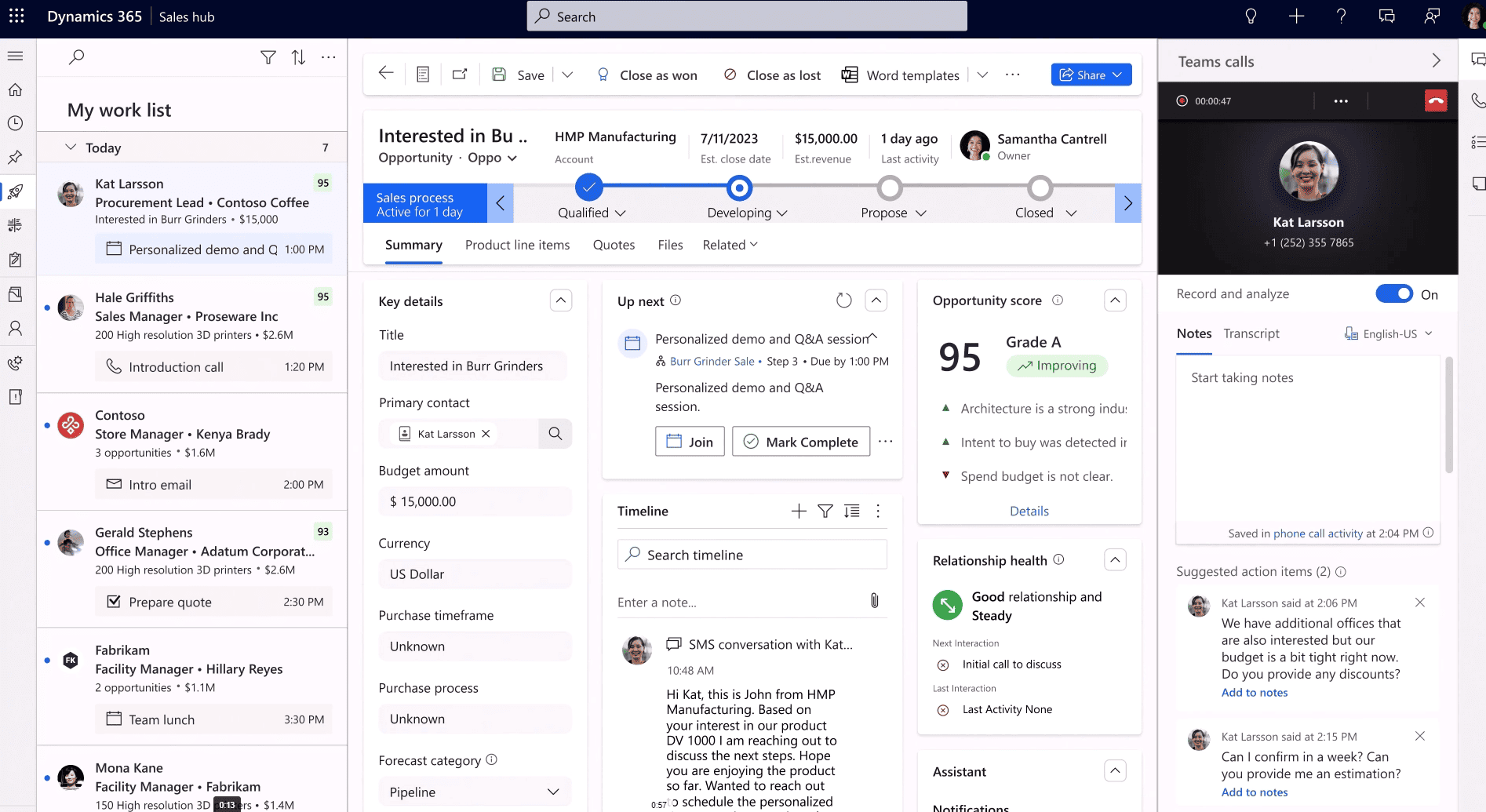
Microsoft Dynamics CRM is a comprehensive solution designed to support businesses of all sizes. If you rely heavily on the Microsoft ecosystem, this CRM can aid in seamless operation.
It is at the top of the list of CRM systems because Dynamics 365 CRM provides advanced integrations with the Microsoft ecosystem, such as Dynamics 365, Microsoft Teams, and Power BI.
This facilitates departmental workflows, enables you to scale efficiently, protects data privacy, provides strong security, and permits international operations.
Features:
-
Copilot-assisted selling: Built-in AI drafts follow-up emails, summarizes long email threads on an opportunity, and surfaces next-best-action suggestions directly inside a deal record.
-
Native Outlook and Teams integration: Reps can log calls, schedule meetings, and update opportunity records without ever leaving their inbox or a Teams chat window.
-
Customizable dashboards and forecasting: Sales managers can build pipeline views and revenue forecasts tailored to how their team reports, rather than a fixed template.
-
Multi-language and multi-currency support: Built-in bilingual English/French records and multiple currencies are genuinely useful for a business operating across Quebec and the rest of Canada.
Advantages:
-
Deep Microsoft ecosystem fit: Teams that already live in Outlook, Excel, and Teams adopt Dynamics 365 Sales faster because the CRM meets them where they already work daily, rather than asking them to learn an entirely separate system.
-
Scales without platform migration: A five-person team on Sales Professional can grow into Sales Enterprise or Premium as needs get more complex, staying on the same underlying platform the entire time.
-
Connects cleanly to Business Central: Businesses that also run Dynamics 365 Business Central for finance get a genuinely unified view between sales pipeline and financial data, without a third-party bridge to build and maintain.
Disadvantages:
-
Configuration-heavy out of the box: Default settings rarely match how a specific sales team works, so real value depends on proper setup rather than simply switching the software on.
-
Cost adds up with add-ons: Premium AI features, extra Power Automate flows, and higher license tiers can push the effective monthly price well above the advertised per-user rate. It's worth budgeting for this upfront rather than being surprised by it at renewal.
Best for:
Canadian businesses already running Microsoft 365 or planning to connect their CRM to finance and operations down the line. It is also a common pick among businesses that specifically want their CRM software connected to finance, which is where ERP and CRM systems conversations usually start.
Zendesk
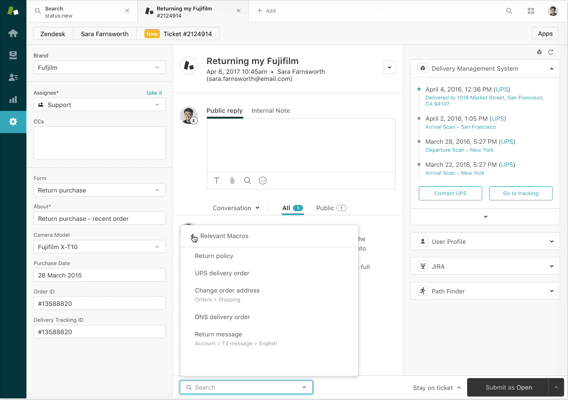
It is built to enhance customer support and satisfaction. Zendesk is popular among service-focused businesses that require intuitive ticketing systems and omnichannel support.
Zendesk CRM enables you to improve response time, boost customer satisfaction, centralize customer interaction, and support self-service options for customers. In addition to this, this client relationship management CRM system is easy to set up and great for customer service teams.
However, these are the best examples of CRM systems, which have limited functionality and may not suit complex workflows.
Features
-
Omnichannel ticketing: Support requests from email, chat, phone, and social media all funnel into one unified ticket queue, so an agent never has to check five different inboxes to find an open issue.
-
AI-powered chatbots: Automated bots handle common, repetitive questions before they ever reach a live agent, reducing overall ticket volume and freeing up human agents for the issues that need a person.
-
Self-service knowledge base: A searchable help center lets customers resolve simple issues themselves, cutting incoming ticket volume down further before a customer even reaches out to a support channel.
Advantages:
-
Best-in-class ticketing depth: Few platforms handle high-volume, multi-channel support tickets as well as Zendesk does straight out of the box, without needing extensive custom configuration first.
-
Strong self-service reduction in load: The knowledge base and bot tools genuinely reduce the number of tickets reaching a human agent, which matters considerably once a support team is dealing with real volume.
-
Recognized, trusted brand: Zendesk's reputation makes it easy to sell internally when a support team needs new tools approved by finance or leadership, since it is a known and trusted name.
Disadvantages:
-
Not a full CRM: There is no real sales pipeline, deal tracking, or forecasting here, so a business needing both sales and service tools together will end up running two separate platforms.
-
Requires integration for a complete customer view: Connecting Zendesk to a separate sales CRM is necessary to see the full customer relationship in one place, which adds integration overhead most all-in-one platforms avoid.
-
Pricing climbs with advanced features: Higher-volume automation, AI, and advanced reporting all sit behind pricier tiers, so the effective cost for a scaling support team grows faster than the entry price suggests.
Best for:
Businesses with high support-ticket volume that need omnichannel service more than sales pipeline tracking. For a business CRM software stack that already includes a separate sales tool, this often becomes the support layer sitting next to it.
HubSpot
.jpg&w=3840&q=90&dpl=dpl_5LXoCh9tPBApVgwSwHKvAKDdFNPt)
It is one of the best CRM system examples, which is versatile and can be a good fit for SMBs. HubSpot can be the best CRM for small business with limited budgets. Even start-ups can leverage its free version.
Using HubSpot, you can manage customer interaction without high upfront costs, scale quickly, simplify marketing campaigns, and get valuable insight.
Its premium features, however, can be pricey, provide little personalization, and have fewer sophisticated analytical capabilities.
Features:
-
Free, unlimited-user CRM core: Contact and deal records, email tracking, and basic pipeline management are available at no cost, without an artificial trial period pushing a business toward a paid plan.
-
Marketing automation tied to sales data: Email campaigns, landing pages, and lead scoring feed directly into the same record a sales rep sees, closing the usual handoff gap between marketing and sales teams.
-
Built-in landing pages and forms: Businesses can launch lead-capture pages without a separate website tool, developer, or design contractor involved.
Advantages:
-
Genuinely free starting point: Unlike many "free trial" CRMs that quietly expire, HubSpot's free tier is real, ongoing software, which lowers the barrier for a small business to centralize customer data without upfront cost.
-
Marketing and sales in one system: Businesses avoid the common problem of leads going cold between a marketing tool and a separate sales CRM, since both functions share the same contact record from first touch onward.
-
Fast initial setup: Most small teams are capturing leads and tracking deals within the same week they sign up, without a lengthy implementation project standing between purchase and actual use.
Disadvantages:
-
Steep price jump at Professional: The cost difference between Starter and Professional tiers is significant, and much of the automation a genuinely growing business needs like sequences, custom reporting, sits just behind that line.
-
Hubs are priced and licensed separately: Marketing, Sales, and Service Hubs are sold as individual products, so wanting full functionality across all three ends up costing considerably more than the entry-level price implies on its own.
-
Contact-based pricing on Marketing Hub: Costs scale with contact list size rather than just seats, which can be expensive quickly for a business with a large but low engagement contact database sitting mostly unused.
Best for:
Small to mid-sized Canadian businesses that want marketing and sales working from the same data without a large upfront implementation. Nevertheless, it is also one of the more commonly recommended options for CRM software for small business teams comparing free-tier platforms in Canada.
Salesforce

It is one of the top CRM systems, with a wide range of tools that help businesses manage their complex needs. In the list of CRM systems, Salesforce, along with Dynamics 365 CRM, helps businesses manage their complex CRM needs.
Salesforce provides deep customer insights, offers robust automation tools, supports complex customization, and allows you to scale. It can be one of the best CRM system for real estate business.
However, Salesforce is costly for small businesses, complex to implement, and has a steep learning curve.
Features:
-
Einstein AI insights: Built-in predictive scoring and AI-generated summaries help reps prioritize which leads and opportunities are worth chasing this week instead of working a list in the order it happened to be entered.
-
Agent Exchange app marketplace: Thousands of pre-built third-party apps and integrations let a business extend Salesforce into nearly any specialized workflow without custom development.
-
Advanced workflow automation: Flow Builder lets admins automate approvals, notifications, and record updates without writing code, once someone learns the tool properly.
Advantages:
-
Unmatched customization depth: Almost every object, field, and workflow can be reshaped to match a specific business process, which is why large, complex sales organizations gravitate here over lighter alternatives.
-
Massive integration ecosystem: If a sales or marketing tool exists, there is a strong chance it already has a Salesforce connector, cutting down on custom integration work most other platforms would require.
-
Scales to enterprise complexity: Multi-team, multi-region sales organizations can run genuinely different processes side by side within one Salesforce environment without one team's configuration interfering with another's.
Disadvantages:
-
Requires dedicated administration: Getting full value out of Salesforce realistically means budgeting for an ongoing administrator, not just the software license itself.
-
Costs climb quickly past entry tiers: The jump from Starter Suite to Pro Suite to Enterprise is steep, and much of the genuinely useful functionality, like full API access and advanced automation that only appears at Enterprise and above.
-
Steep learning curve for new users: The interface and configuration options can overwhelm a small team without prior CRM experience or dedicated training time set aside.
Best for:
Larger Canadian organizations with the budget and internal resources to manage ongoing configuration. Moreover, real estate brokerages evaluating real estate CRM software at the enterprise end of the market often shortlist Salesforce for exactly this reason.
Zoho CRM
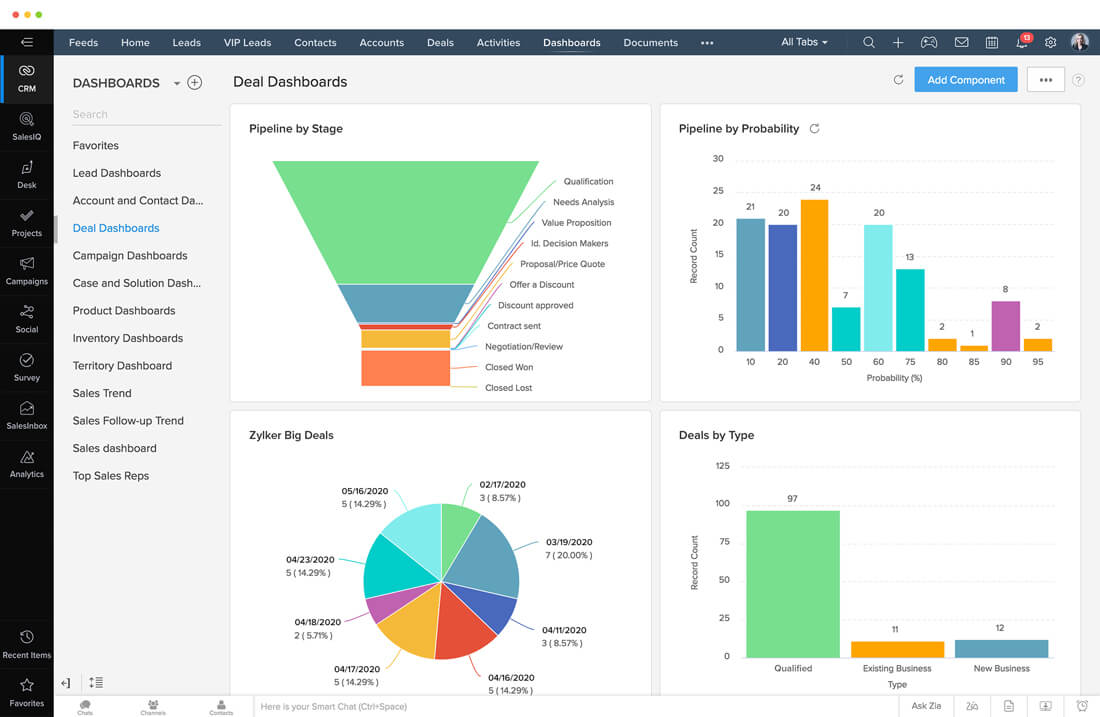
It is a cost-effective CRM for growing businesses. SMBs can find it ideal as it comes with a blend of affordability and powerful features.
Zoho CRM facilitates quick deployment, streamlines corporate procedures, guarantees smooth integration, and enhances channel-to-channel collaboration.
However, because of the restricted advanced features, large enterprises will not be able to leverage the benefits of CRM systems for their complicated process. It also occasionally has performance problems.
Features:
-
Zia AI assistant: Built-in AI handles lead and deal predictions, anomaly detection, and conversational queries about CRM data, so a sales manager can ask a plain-language question about pipeline health instead of building a custom report.
-
Blueprint process automation: A visual process builder lets a business enforce multi-step sales or approval processes without custom development, guiding a rep through the exact steps a deal is required to pass through before it can close.
-
Multi-channel communication: Email, phone, live chat, and social media messages can all be managed from within the same contact record, so nobody on the team must check four separate inboxes to understand a customer's full history.
Advantages:
-
Strong price-to-feature ratio: Zoho consistently delivers more functionality per dollar than its higher-priced competitors, which matters considerably for a cost-conscious small or mid-sized Canadian business.
-
Genuine free tier: Businesses with up to three users can run real, functional CRM software at no cost, not just a stripped-down trial designed to expire and push an upgrade.
-
Connects to a wider suite: Zoho Books, Zoho Analytics, and Zoho Desk let a growing business expand its toolset within one vendor relationship instead of managing separate contracts and logins across several vendors.
Disadvantages:
-
Ceiling for complex enterprises: Businesses with highly specific, complex workflows tend to outgrow what the Standard and Professional tiers can automate and end up needing Enterprise or Ultimate sooner than expected.
-
Occasional performance lag: Some users report slower performance as data volume and customization grow, particularly in lower tiers where the underlying infrastructure allocation is lighter.
-
Support quality varies by tier: Faster; more responsive support is often tied to higher-priced plans, which can genuinely frustrate Standard-tier customers dealing with an urgent issue.
Best for:
Small business CRM software buyers in Canada who want a strong feature set without enterprise pricing. Zoho is frequently the platform businesses land on once they have compared CRM software Canada pricing across several vendors and want the best value.
Also Read: CRM for SMB
Pipedrive
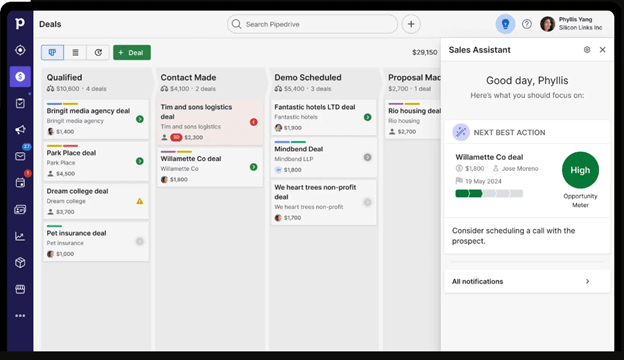
It is one of the sales-centric CRM system tools that focuses on pipeline management. It is perfect for companies who need to track their deal. Pipedrive helps you increase sales efficiency, boost team productivity, simplify pipeline visualization, and transparently track sales progress.
However, it has limited marketing tools, lacks robust analytics, and is less suitable for larger teams.
Features:
-
Visual, drag-and-drop pipeline: Deals move through customizable pipeline stages like simple cards, giving reps an at-a-glance view of exactly where every deal stands without running a report to find out.
-
Activity-based selling: The platform is built around scheduling and completing the next concrete action on a deal, which keeps reps moving things forward instead of letting a deal quietly stall in someone's memory.
-
Email tracking and templates: Built-in email sync tracks open and clicks, and reusable templates cut down on repetitive typing for common outreach like follow-ups and proposal sends.
Advantages:
-
Fast to roll out: Most small teams are actively using Pipedrive within days, not weeks, because the interface maps directly onto how salespeople already think about a pipeline.
-
Purpose-built simplicity: Because it does not try to be a marketing platform or a help desk, the sales-specific features stay focused and uncluttered rather than buried under menus for functions a sales team never touches.
-
Genuinely affordable entry point: Lower-tier pricing makes it accessible to small businesses that would find Salesforce or Dynamics 365 out of reach at launch, without sacrificing the core pipeline functionality most small teams need day to day.
Disadvantages:
-
Limited depth in reporting: Analytics and forecasting stay basic even on higher tiers, which is a real constraint for a business that wants sophisticated, multi-dimensional sales reporting.
-
Weak marketing capability: Businesses that need email marketing or lead-nurture automation will need a separate tool entirely, since Pipedrive's own marketing features are thin compared to HubSpot or Active Campaign.
-
Not built for cross-department connection: A business that wants its CRM genuinely tied to ERP, finance, or customer service data will hit a ceiling here faster than with Dynamics 365 or Salesforce, both of which are designed for that kind of connection from the ground up.
Best for:
Small to mid-sized sales teams that have avoided CRM software because everything else felt too heavy to roll out. It also shows up often on sales CRM software shortlists for teams that just need pipeline visibility without a marketing suite attached.
Apptivo

It is a flexible CRM tool with 50+ integrated business apps for small businesses. Apptivo CRM allows you to manage your sales, marketing, contacts, and customer service.
This integrated business application can improve your workflow, reduce reliance on various tools, save operating time, and reduce errors. In addition, Apptivo allows you to manage multiple business functions using a single platform.
However, it lacks advanced analytics and has limited integration capabilities with third-party applications.
Features:
-
Lead and opportunity tracking: Standard CRM functionality for managing leads through to closed deals sitting at the core of the platform, covering the basics most small businesses expect from any CRM software.
-
Built-in invoice: Quotes and invoices can be generated directly from a closed deal, without exporting data to separate accounting software or re-entering the same numbers twice. That closes a gap a lot of standalone CRMs leave open.
-
Customizable modules: Businesses can turn on only the applications they need such as CRM, project tracking, supply chain, and ignore the rest, keeping the interface from feeling cluttered with unused functionality.
Advantages:
-
Broad functionality under one login: Consolidating CRM, invoicing, and project tracking cuts down meaningfully on the number of separate subscriptions and logins a small team must manage day to day.
-
Genuinely affordable for what's included: Given how many applications are bundled into a single price, the per-user cost is competitive against buying several separate point solutions to cover the same ground.
-
Flexible for varied small business needs: The modular design lets very different types of small businesses including a service shop, a small retailer, a consultancy that configure the platform around their specific mix of needs.
Disadvantages:
-
Basic analytics: Reporting and dashboards stay shallow compared to dedicated CRM platforms, which limit deeper sales or performance analysis for a business that wants more than surface-level numbers.
-
Steep learning curve for the breadth offered: With so many modules available at once, new users can find the interface genuinely overwhelming to navigate during their first few weeks.
-
Limited third-party integrations: Compared to Zoho or HubSpot, Apptivo's marketplace of external integrations is noticeably smaller, which can matter for a business with tools outside the Apptivo ecosystem already in place.
Best for:
A small operation that wants sales, invoicing, and project tracking handled inside one login.
Freshworks CRM

Freshworks allows companies to manage sales processes, track interactions, and centralize client data on a single platform. It has AI-powered features that let you increase sales effectiveness and client interactions.
Contact management, opportunity tracking, and sales automation are few features that Freshworks offers to help you improve client engagement. This increases teamwork, facilitates communication, and raises lead conversion rates.
However, it has a moderate learning curve, fewer third-party connectors, and little customization for more experienced users.
Features:
-
Predictive contact scoring: Built-in AI ranks leads and contacts by likelihood of converting, helping a small sales team decide who to call first out of a long, undifferentiated list.
-
Built-in phone and email: Native calling and email, without needing a separate telephony integration, keeps communication logged automatically against the right contact record.
-
Workflow automation: Rule-based automation handles routine tasks like lead assignments and follow-up reminders without manual intervention from a sales manager.
Advantages:
-
Genuine AI-assisted prioritization: The lead-scoring engine is one of the stronger ones available at this price point, meaningfully cutting down on wasted outreach to low-quality leads.
-
Reasonable pricing for the feature set: Freshsales sit between Pipedrive-level simplicity and Salesforce-level cost, offering solid mid-market functionality without stretching into enterprise pricing.
-
Communication built in natively: Not bolting on a separate phone or email tool reduces both the monthly cost and the number of separate systems a rep must check throughout the day.
Disadvantages:
-
Smaller integration library: Compared to HubSpot or Salesforce, the pool of native third-party integrations is noticeably thinner, which matters more for a business running a varied or unusual existing tech stack.
-
Learning curve on advanced features: While the basics are easy to pick up, getting full value from the automation and AI scoring tools takes more configuration time and testing than the marketing copy tends to suggest.
-
Less brand recognition in Canada: Fewer local implementation partners and community resources exist compared to more established platforms like Microsoft CRM or Salesforce which can slow down troubleshooting when something breaks.
Best for:
Sales teams that want AI-assisted prioritization without Salesforce-level complexity.
Creatio

Creatio CRM is a "no-code" platform that allows businesses to automate sales and marketing processes, customer interactions, and build custom applications without writing code. It is designed for companies that require heavy customization.
Users can design and build CRM workflows visually without needing programming knowledge. This enables rapid deployments, simplifies complex processes, improves operational efficiency, and is highly flexible.
However, it has a steeper learning curve, requires skilled implementation, and has higher pricing for advanced modules.
Features:
-
Visual, no-code process builder: Entire sales, marketing, or service workflows can be designed and modified visually, without developer involvement, using a drag-and-drop canvas rather than a code editor.
-
Unified customer data: Sales, marketing, and service data live in one connected environment rather than siloed modules, so a customer's full history is visible regardless of which department is looking.
-
Predictive analytics: Built-in AI helps forecast deal outcomes and flag risk based on historical patterns in the data, giving a sales manager an early warning before a deal is officially lost.
Advantages:
Genuine no-code flexibility: Business users, not just developers, can build and adjust complex workflows as the business changes over time, without waiting on an IT backlog for every small process change.
Strong fits for unusual processes: Businesses whose workflow does not match a typical sales or service template get more real flexibility here than in most rigid, template-driven CRM platforms built around a generic process.
Unified view across functions: Because sales, marketing, and service share one underlying data model, handoffs between departments are noticeably cleaner than in disconnected point solutions stitched together after the fact.
Disadvantages:
Steep initial learning curve: Despite being labelled no-code, understanding the platform's underlying process-design concepts takes real time to learn properly before a team can build anything sophisticated.
Requires skilled implementation: Getting genuine value typically means working with an experienced implementation partner from the start, which adds cost on top of the base license fee.
Higher pricing at advanced tiers: Once a business needs more sophisticated modules and automation capability, pricing climbs meaningfully compared to simpler CRM platforms on this list.
Best for:
Businesses with unusual or highly specific workflows that need heavy customization without hiring developers. In addition, businesses connecting ERP and CRM systems into one no-code environment are a common fit for Creatio specifically.
ActiveCampaign

ActiveCampaign CRM allows businesses to manage and automate their sales processes, track customer interactions, and deliver personalized marketing campaigns. It is suitable for marketing-focused companies, as you can access features like lead scoring, sales routing, and automated email sequences, all within a single platform.
It guarantees smooth interaction with e-commerce platforms, boosts sales through automation, streamlines campaign management, and improves client retention.
But it lacks sophisticated sales capabilities, has few non-marketing features, and can be intimidating for new users.
Features:
-
Advanced automation workflows: Visual automation builders let a business create sophisticated, multi-branch email sequences based on subscriber behavior, without needing developer support to set them up.
-
Lead scoring and segmentation: Contacts are automatically scored and segmented based on engagement, so campaigns can target the right audience without a marketer manually building and maintaining lists by hand.
-
Basic CRM and pipeline: A lightweight sales pipeline sits alongside the marketing tools, enough to track deals for a light-touch sales process but not built for a complex, multi-stage B2B cycle.
Advantages:
Sophisticated automation at a reasonable price: The depth of workflow automation available here often rivals platforms costing significantly more per user, which makes it a strong value pick for a marketing-led business on a tighter budget.
Strong for e-commerce and content-led businesses: Purchase-triggered and behavior-triggered campaigns are genuinely effective for businesses selling directly to consumers, where timing a follow-up email correctly can meaningfully lift conversion.
Relatively easy to learn: Despite the depth of what's possible, the visual workflow builder stays approachable without needing a dedicated marketing operations specialist on staff to maintain it.
Disadvantages:
Weak sales pipeline depth: Businesses with a genuine, multi-stage B2B sales process involving several stakeholders will find the CRM side noticeably thin compared to Pipedrive or Salesforce.
Not built for complex forecasting: There is little in the way of serious sales forecasting or territory management for a growing sales team that needs to plan quota and coverage more formally.
Pricing scales with contact volume: Costs increase as the contact list grows regardless of how engaged those contacts actually are, which can surprise a business sitting on a large but not particularly active list.
Best for:
Businesses where email is the primary sales channel and the sales process itself is light touch. It is a frequent pick among business CRM software buyers whose sales motion is mostly email-driven rather than call-heavy.
Insightly

Insightly is a cloud-based CRM platform that helps businesses manage customer interactions, leads, sales opportunities, and projects. It is suitable for companies that want project-driven companies.
Insightly enables you to streamline workflows, enhance team collaboration, offer insights into project performance, and centralize project management. However, it has limited scalability for larger enterprises, fewer integrations, and is unsuitable for complex analytics.
Features:
-
Project milestone tracking: Projects tied to closed deals can be tracked through defined milestones, keeping delivery visible alongside the original sale rather than disappearing into a separate project tool once the contract is signed.
-
Relationship mapping: The platform visually maps relationships between contacts and organizations, which is genuinely useful for selling into complex accounts with several decision-makers involved in one deal.
-
Email tracking: Built-in email tracking logs opens and replies against the right contact automatically, without requiring anyone to manually note that a conversation happened.
Advantages:
CRM and project management are genuinely connected: Few CRMs tie post-sale delivery this cleanly to the original deal record, which matters considerably for services businesses where the relationship does not end at the signature.
Strong fit for relationship-heavy sales: The relationship-mapping tools are genuinely useful for account-based selling into organizations with several decision-makers, letting a rep see the full web of contacts immediately.
Solid data security options: HIPAA and GDPR-compliant configurations make it a reasonable fit for businesses handling sensitive client data, including healthcare-adjacent or professional-services firms.
Disadvantages:
Limited scalability for large enterprises: Businesses that grow past mid-market size tend to find Insightly's ceiling lower than Salesforce or Dynamics 365 and eventually look at migrating to a larger platform.
Fewer integrations than larger competitors: The third-party app ecosystem is smaller, which can matter for a business running a varied existing tech stack that needs several native connections.
Marketing and service features cost extra: Beyond core CRM and project tracking, additional functionality is priced as separate add-ons, which raises the effective monthly cost above the advertised base price.
Best for:
Project-driven businesses that need their CRM and project management connected.
Note: This comparison makes it easier to see which CRM software examples on this list are built for your situation before you get into pricing.
CRM Pricing Table in Canada (2026)
Pricing table of the top CRM solutions in Canada 2026
| Platform | Entry Tier (approx. CAD/user/mo) | Mid-Tier (approx. CAD/user/mo) | Top Tier (approx. CAD/user/mo) |
|---|---|---|---|
| Microsoft Dynamics 365 Sales | CAD $88.20 (Professional) | CAD $142.50 (Enterprise) | CAD $203.50 (Premium) |
| Zendesk | CAD $26 (Support Team) | CAD $76 (Suite Team) | CAD$159 (Suite Professional) |
| Hubspot | CAD $13 (Starter) | CAD $121 (Professional) | CAD $182 (Enterprise) |
| Salesforce Sales Cloud | CAD $35 (Starter Suite) | CAD $138 (Pro Suite) | CAD $242 (Enterprise) |
| Zoho CRM | CAD $19 (Standard) | CAD $31 (Professional) | CAD $44 (Enterprise and CAD $47 Ultimate) |
| Pipedrive | CAD $19 (Lite) | CAD $34 (Growth) and CAD $68 (Premium) | CAD $95 (Ultimate) |
| Apptivo | CAD $28 (Lite) | CAD $41 (Premium) | CAD $69 (Ultimate) |
| Freshworks CRM | CAD $13 (Growth) | CAD $57 (Pro) | CAD $85 (Enterprise) |
| Creatio | CAD $55 (Growth) | CAD $104 (Enterprise) | Custom (Unlimited) |
| ActiveCampaign | CAD $20 (Starter) | CAD $66 (Plus) and CAD $107 (Pro) | CAD $196 (Enterprise) |
| Insightly | CAD $40 (Plus) | CAD $68 (Professional) | CAD $137 (Enterprise) |
Types of CRM Systems
There are no specific types of CRM system tools, as many people classify them into four, while some classify them into three. We will go with the three types of CRM systems based on their primary functionality:
Operational CRM
This CRM focuses on automating and improving customer-facing business processes such as sales, marketing, and service. You can use operational CRM to automate email campaigns, manage leads, or track customer support tickets.
Analytical CRM
This is primarily used to analyze customer data and make informed business decisions. You can use analytical CRM to identify sales trends, measure marketing ROI, and segment customers.
Collaborative CRM
This enhances how information moves between departments, so a support agent can see what sales promised, a customer and a sales rep can see an open support ticket before calling to upselling.
Note: Nowadays, modern CRM systems come with features of all three types. The The one of the best CRM software examples Microsoft Dynamics CRM, which empowers you to leverage it as per your requirements.
What Are the Uses of CRM Software?
CRM software earns its subscription cost across a handful of everyday functions:
-
Lead and Contact Management: A running record of every conversation with a current or prospective client, instead of relying on someone's memory or inbox.
-
Sales Pipeline Management: Tracking a deal from first contact through to close, with visibility into where it's stalling.
-
Marketing Automation: Launching, monitoring, and refining campaigns without manually tracking who opened what.
-
Customer Service: Resolving support questions efficiently, with full context on the customer's history available to whoever picks up the ticket.
-
Data Analytics: Turning raw activity into decisions like which lead sources convert, which reps are closing fastest, where the pipeline is thinning out.
-
Integration with Other Business Tools: A CRM for ecommerce businesses, typically connects to email platforms, online storefronts, and accounting systems, so customer and financial data stay in sync.
Note: Between these use cases, it is easy to see why sales CRM software and marketing-only tools keep merging into single platforms over time.
How AI Is Changing CRM Software in 2026
AI is changing what a CRM even is. It used to be a filing cabinet — a place to dump customer info. Now it can actually tell your team what to do next. The newer tools will read through your customer interactions, flag sales opportunities, take the routine stuff off your plate, make predictions, and even sit in on conversations to help your employees out.
So what does that mean for a Canadian business? Less typing data into boxes. Faster follow-ups on leads. Sales plans based on something better than a guess. Customer service that actually responds.
But here's the catch: "AI" doesn't mean the same thing on every platform, and it doesn't mean the same thing at every price tier. Before you buy, look at what the AI actually does in your day-to-day workflow — not just what the feature list says it can do.
AI CRM Capabilities at a Glance
| AI capability | Business use | CRM examples in this list |
|---|---|---|
| AI lead scoring | Prioritise prospects with stronger conversion signals | Dynamics 365, Salesforce, Zoho, Freshworks |
| Predictive forecasting | Improve revenue and pipeline forecasting | Dynamics 365, Salesforce, Zoho, monday CRM |
| Generative AI | Draft personalised emails and follow-ups | Dynamics 365, Salesforce, monday CRM |
| AI customer-service agents | Answer questions and route service requests | Zendesk, Salesforce |
| Churn prediction | Identify customers at risk of leaving | Salesforce, AI-enabled CRM platforms |
| Next-best-action recommendations | Suggest the next step for sales teams | Dynamics 365, Salesforce, Zoho, Freshworks |
| Call/email summarization | Reduce manual CRM updates and surface key information | Dynamics 365, Salesforce, Freshworks |
CRM Software by Industry
We know, the right CRM software often depends heavily on the industry using it, and Canadian businesses in a few sectors have compliance and workflow needs that a general-purpose platform does not automatically cover.
Below are four categories where Canadian businesses most often ask for something more specific than generic CRM software Canada listings tend to cover.
Real estate CRM software
Real estate CRM software needs to handle listing-to-close workflows, automated follow-ups with buyers and sellers across long sales cycles, and integration with local listing services in markets like Toronto, Vancouver, and Calgary. Agents and brokerages generally get more value from CRM platforms with strong mobile apps and automated drip campaigns than from deep analytics they'll rarely open.
Nonprofit CRM software
Nonprofit CRM software carries a different set of requirements entirely. A Canadian charity needs donor and donation tracking that maps cleanly onto CRA reporting obligations, including the annual T3010 information return filed with the CRA Charities Directorate, along with grant and program tracking that most commercial CRM platforms treat as an afterthought.
Moreover, nonprofits incorporated federally also need their governance records aligned with the Canada Not-for-profit Corporations Act, and provincially incorporated organizations in Ontario file through the Ontario Business Registry. Nevertheless, choosing nonprofit CRM software without checking CRA reporting fit first is one of the more common and avoidable mistakes charities make.
Automotive CRM software
Automotive CRM software needs to manage a sales pipeline that runs through trade-in valuations, financing approvals, and service reminders long after the sale, a workflow that looks nothing like a typical B2B pipeline. Dealerships across Ontario, Alberta, and British Columbia increasingly expect their CRM to talk to their dealer management system (DMS) directly rather than requiring manual data entry between the two. Furthermore, dealerships shopping automotive CRM software across Canada usually prioritize DMS integration above almost anything else on this list.
Business CRM software for professional services
Business CRM software for professional services such as accounting firms, consultancies, law offices that tend to prioritize time tracking, engagement management, and billing integration over classic sales pipeline features, since the "sale" is often a long referral relationship rather than a single transaction.
Also Read: CRM for Manufacturing
Features to look for in a CRM
Here are the key features you should consider when choosing a CRM system, including real estate CRM.
Customization Options: CRM gives you the ability to modify the solution to meet your unique requirements, which boosts output.
Seamless Integration: In order to minimize operational silos, it should be able to integrate easily with current technologies such as project management software, accounting software, and email.
Mobile Access: Seek out client data management that allows you to manage it while on the go, giving you more freedom.
Automation: Select CRM programs that assist you in automating tedious processes such as data entry and email marketing.
Predictive analytics: It is a crucial feature of the best CRM system in order to spot trends and opportunities.
Predictive analytics: AI-assisted forecasting and lead scoring that flags which opportunities and customers deserve attention first, increasingly a baseline expectation rather than a premium add-on in 2026.
Note: These are the same criteria worth applying whether you are comparing enterprise platforms or simple CRM software for small business shortlists.
Selecting the Right CRM System
Choosing the best CRM software involves evaluating your business’s specific needs and objectives. Here are some steps to guide you:
Assess Your Needs: Identify the specific problems you are trying to solve, including is it a leaky sales pipeline, disconnected customer service, or a marketing team working blindly? The answer usually points toward one of the categories above before you even look at pricing.
Set a Realistic Budget: Factor in the CAD conversion and provincial sales tax discussed above, not just the USD sticker price, and account for what implementation and training will add on top. CRM pricing varies enormously by platform and tier, so this step should come after you have narrowed down which category of CRM fits your business.
Check Feature Fit, Not Feature Count: A platform with 200 features you will never use is not better than one with 20 features your team will adopt.
Read Canadian-Specific Reviews: A glowing US review does not tell you whether a vendor supports bilingual fields, Canadian data residency, or provincial tax handling in their invoicing.
Request a Demo: Test the actual interface with your own data and your own team before committing, adoption problems show up in the first fifteen minutes of hands-on use, not in a features PDF.
Consider Implementation Support: A platform is only as good as its setup. Reliable onboarding, training, and ongoing support from either the vendor or an implementation partner is often what separates a CRM your team uses daily from one that quietly falls out of use within a year.
How Dynamics Square Can Help You Find the Right CRM Software
The businesses that get the most value out of a CRM are not necessarily the ones with the fanciest platform, they are the ones whose implementation matches how their team works day by day.
That's where we come in. Dynamics Square Canada is a Microsoft Gold Certified partner based in Ontario and British Columbia, and our role is not to push every client toward the same product. We start by understanding your sales process, your compliance requirements, and what breaks in your current setup, whether that's Dynamics 365 Sales, a Business Central-connected CRM, or a smaller platform that fits a leaner team better.
Our 135+ consultants have implemented CRM systems across Canadian industries from professional services to nonprofits to automotive dealerships, and that hands-on experience is what tells us when Dynamics 365 is genuinely the right fit and when a business is better served by something else entirely. Furthermore, Dynamics Square Canada has helped teams across Toronto, Montreal, and Vancouver make exactly this kind of decision.
Get in touch with our consultants, via call at +1 778 381 5388 or send an email at info@dynamicssquare.ca to know more about CRM implementation!