"Is your business small to medium-sized? Are you looking to level up your business with Microsoft Dynamics Business Central and would you like to compare it with other cloud-based enterprise resource planning (ERP) solutions? This blog is for you. Explore this blog to learn about alternatives and competitors of Microsoft Dynamics 365 Business Central and make an informed decision."
If you're searching for top alternatives to Microsoft's all-in-one ERP solution—Dynamics 365 Business Central (formerly, Microsoft Dynamics NAV)—you've landed on the right blog post.
Table of Contents
This blog includes the list of top all-time competitors of Business Central, including the ones that you've probably never heard of before.
So, let's get started with a little brief about Dynamics 365 Business Central, its core features, and its benefits.
Why choose Dynamics 365 Business Central?
Microsoft Dynamics 365 Business Central (Online) has been in the market for small and medium-sized enterprises (SMEs) for a long time, as has Dynamics NAV. The one thing that makes it a better choice for businesses is its availability for cloud, on-premises, or hybrid deployment.
With this unified business management solution that comes with built-in AI-powered data analytics, reporting features, and thousands of apps from the AppSource, retailers can easily automate mundane tasks and streamline business processes for better efficiency and quality control.
Finance and operations teams already working in Outlook, Excel, and Teams do not have to learn about a new environment, which usually shortens the adoption curve. Nevertheless, manufacturing functionality needs a premium license.
Core features of Business Central
Below we mention some of the major features:
Financial management, including general ledger, payables, receivables, bank reconciliation, and dimensions
Purchasing, sales, and order management
Inventory management, including forecasting
Warehouse management, including shipments and receipts
Project (job) management
Basic HR records and basic customer relationship tools (contacts, opportunities). Full CRM needs Dynamics 365 Sales.
Cash flow forecasting and Copilot
Integration with Outlook, Teams, Excel, Power BI, and third-party apps such as Shopify
Multiple companies in one tenant, workflows, job queue, retention policies
Business Central pricing for Canadian businesses
Business Central pricing is based on a per-user, per-month licensing model. Microsoft's listed prices are CAD $108.50 per user for Essentials, CAD $149.20 for Premium, and CAD $10.90 for Team Members, billed annually. The Premium plan includes additional manufacturing and service management capabilities, making it suitable for businesses with more advanced operational requirements.
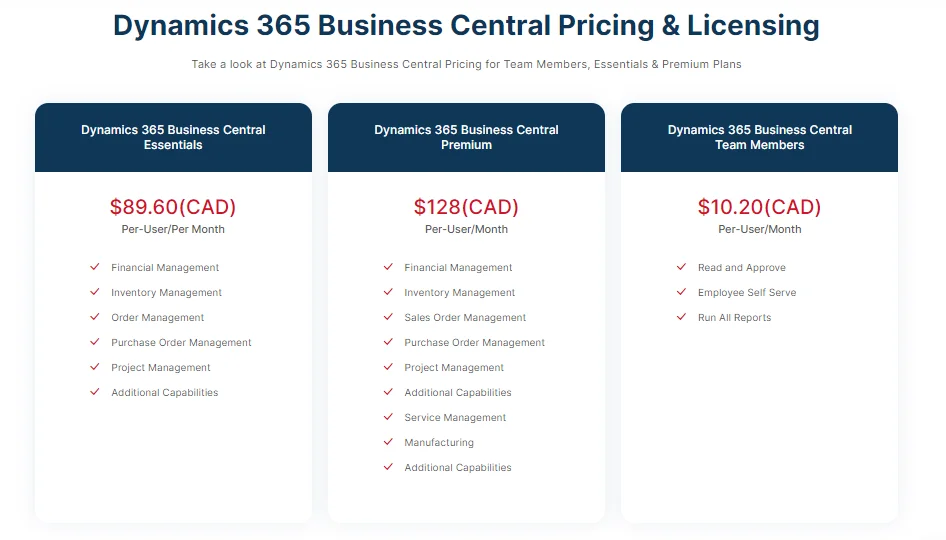
Note: The implementation cost is not included in the Pay-as-you-Use model. Connect with your Microsoft Dynamics 365 Partner and share your requirements to reveal the Implementation Cost of Business Central ERP.
Now that you know what Business Central is and what it is capable of, let’s look at the brief list of its top all-time competitors.
Microsoft Dynamics 365 Business Central Vs Other Top ERPs
The list of all top competitors of Business Central can be exhaustive, but below are the most searched ERPs today when selecting Business Central.
SAP Business One or SAP B1
SAP has a combined market share of 10.38% and 14.25%, which goes with Workday. Whereas Microsoft Dynamics 365 has 27.43% of the market share. The rest goes with other ERPs. The purpose of laying out these statistics beforehand is to show you the preference of Microsoft ERP among companies for ERP needs against other comparable products.
Pros of SAP B1
Informed Decision-Making for Seamless Evaluation and Contracting.
Easy Integration and Deployment to Drive Revenue Growth.
Excellent Service and Post Implementation Support.
Strong product capabilities and cost management functionality.
Innovation-driven tools and functionalities to develop impactful production plans that are far-reaching and can meet expectations at par.
Cons of SAP B1
Though deployment is easy but a bit complex, time-consuming, and expensive compared to Microsoft Dynamics Business Central
Companies can only run using the Microsoft SQL database, while Dynamics 365 has an excellent database structure (SQL Server, Oracle, PostgreSQL, MYSQL, and more).
Requires higher maintenance and upgrade costs.
The SAP Business One Pricing (for one-time purchases):
Professional Module: CAD $2357.16 per month
Limited Module: CAD $1222.23 per month
Starter Module: CAD $995.24 per month
Website: SAP B1
Oracle ERP
Though Oracle has many premium add-ons and capabilities, Dynamics 365 Business Central is specifically designed for manufacturers and distributors to unify their business management. Plus, if companies choose the basic package of Business Central, they get warehouse and supply chain management at no extra cost.
Pros of Oracle ERP
Availability of Consistent and Quality Data
Multiple Standard Interfaces and Support for Custom Interfaces to allow interactions with external systems.
OCI facility to lift and shift database from on-premises to cloud.
Scheduler option and automatic circulation of reports to save time.
Forecast and detailed report generation for all employee expenses.
Easy to export data in different formats (when needed).
Cons About Oracle ERP
Few standard dashboards compared to Dynamics 365 Business Central, which has a pool of user-friendly dashboards for the assigned roles.
Does not allow the use of multiple functions at the same time compared to Business Central.
Outdated user interface (UI) that makes it difficult to navigate and requires its users to memorize specific paths. While with Business Central, even an inexperienced user can use its functions.
Difficult to understand instructions for customization against Business Central.
Oracle ERP Pricing: Starts at CAD 238.34 per user per month
Website: Oracle ERP
Sage Intacct
Sage Intacct is a leading ERP system for financial accounting and comes with a broad set of functionalities for small- to medium-sized businesses. This cloud ERP is easier to admin, more usable, and seamless to manage your business with but lacks on many fronts compared to Dynamics 365 Business Central.
Pros of Sage Intacct
Fantastic for Sales
Easy-to-navigate user interface
Easy project tracking
Makes it easy to track revenue and expenses
Easy payments and payroll integration
Cons of Sage Intacct
Glitches in integrated tools
Extra cost to make work simpler against Dynamics 365 Business Central
Poor or incomplete features
Problems in recurring options for bills/invoices action
Sage Intacct Pricing: Starts from CAD 2257.11 per month
Website: Sage Intacct
Infor LN ERP
This cloud ERP is popular for its easy-to-use user interface (UI) and helpful commands and allows flexible customization and integration of third-party apps. However, it is far behind Business Central, which comes with a highly intuitive UI and has a pool of apps at Microsoft AppSource. This is specifically designed and developed for the construction industry, while D365 BC is for manufacturers and distributors to help them make their supply chain more resilient, intelligent, and future-ready.
Pros of Infor LN ERP
Availability of shortcuts before commands to make it easier for its users to use this application.
Easy learning curve
Easy to customize
Staged payment functionality
Makes it easy to categorize project costs based on different milestones of completion
Cons of Infor LN ERP
Poor cache system for web-based applications compared to Dynamics Business Central, which is excellent at helping the user track their usage journey.
Complicated installation and consists of random errors and is prone to ERP implementation failures compared to Dynamics 365 Business Central, which is easy to deploy within 6 to 8 months with the lowest failure rate.
Poorly developed modules for specific business needs.
Requires the purchase of multiple products for integration to have full ERP functionality.
Pricing for Infor LNP ERP: Ranges from CAD $213.43 to CAD $426.87
Website: Infor ERP
Epicor ERP
Epicor is designed and developed to address the needs of distributors and comes with great, easy-to-use features. But it requires developers on staff if you want to customize it for your specific business needs.
Pros of Epicor ERP
Flexible integration with third-party software and allows customization
Easy data entry
Easier ways to create and run reports
Uses an SQL database to run compared to Business Central, which has access to a broad set of popular databases like PostgreSQL, MySQL, Microsoft SQL, and more.
Cons of Epicor ERP
Nice software but with poor support.
Built on dated software technologies.
Displays ambiguous errors that are hard to solve at times.
Complex implementation
Epicor ERP Pricing: Starts from CAD $177.86 per user monthly
What Canadian businesses should consider when choosing a cloud ERP
Here are the checks that matter:
GST/HST and provincial taxes: A distributor selling across Ontario, British Columbia, and Quebec needs GST/HST, PST, and QST applied correctly on every invoice, with input tax credits tracked. Tax setup is where Canadian rollouts often slip, so test it with real transactions. The ERP supplies the numbers for your CRA return, but filing still happens through CRA channels such as GST/HST NETFILE.
Canadian financial reporting: Many private companies report under ASPE, while others use IFRS. Check chart of accounts flexibility, year-end reports, and what your accountant needs.
Multi-currency: Trading in CAD and USD means revaluation and realized gains and losses must work without manual journals.
Payroll and local integrations: Canadian payroll (CPP, EI, T4) is often handled through a separate provider or add-on, whichever ERP you choose. Also confirm your bank's EFT file formats, e-commerce platform, and shipping tools.
Data and privacy: Ask where your data is hosted. Business Central is localized by Microsoft for Canada and can be hosted in Microsoft's Canadian Azure region. For other vendors, ask directly. PIPEDA applies to most private-sector businesses, and Quebec's Law 25 adds stricter rules.
Microsoft 365 ecosystem: If your team lives in Outlook, Excel and Teams, native integration reduces training and workarounds. If not, this matters less.
Industry, size, users and implementation: Licence cost is only part of it. Count full and light users, the entities you'll run, migration effort and whether a partner in Canada knows your industry.
Which cloud ERP is right for your business?
Business Central: suitable for small and mid-sized businesses that need integrated finance, operations, inventory, sales and supply chain, especially within the Microsoft ecosystem.
SAP Business One:suitable for growing businesses that prefer the SAP ecosystem.
Sage Intacct: suitable for organizations primarily focused on financial and accounting management.
Oracle ERP: better suited to organizations with more complex, enterprise-scale requirements.
Epicor: worth considering for manufacturing and distribution-focused businesses with specific industry requirements.
Note:The best ERP depends on business size, industry, operational complexity, integration, budget and growth requirements.
Summary!
Business Central is an amazing ERP solution if you want to bring all your operations on a unified interface and control your business at your fingertips. Ideally, this all-in-one cloud-based ERP is best suited for companies that are already using Microsoft products like Office 365, Outlook, Microsoft Teams, Microsoft Power BI, Microsoft Dynamics AX, GP, or NAV and belong to small and medium size companies. Not only can businesses efficiently manage their financials and operations, but they can also enable automation to optimize repetitive tasks and enhance business efficiency.
In addition to that, the cost of Business Central ERP is comparatively lower than other ERPs in the stack and requires the lowest maintenance and support. More interestingly, you get to do more with less since Microsoft handles almost all errors, cyber threats, and other complexities (if any).
Get in Touch with Your Canadian Dynamics 365 Business Central Partner to learn more.
Frequently Asked Questions
Yes, for many. Microsoft provides a Canadian localization, and Business Central can be hosted in Microsoft's Canadian Azure region. It supports GST/HST and provincial taxes, but you should confirm PST/QST setup, Canadian payroll, and any industry requirements with a Business Central partner before committing.
Both target growing SMBs. Business Central runs on Azure and is closely tied to Microsoft 365 and Power BI. SAP Business One runs on SQL Server or SAP HANA and suits companies that prefer SAP's ecosystem. Compare partner support in your region, industry fit, integration and total cost over several years, not licence price alone.