Business Central for Manufacturing is a good ally for business in the world of Industry 4.0. It helps Canadian manufacturing companies beat the competition and stay agile by offering multiple functionalities, such as real-time data, a simple user interface, and industry-specific modules.
Moreover, manufacturing companies are adopting lean manufacturing to improve profitability, enhance customer satisfaction, and reduce waste.
Table of Contents
This is where you can utilize the powerful functionalities of D365 BC to fulfill varying requirements and deliver quality production at lower costs.
It empowers you to simplify the manufacturing process, automate repetitive tasks, and eliminate data silos.
Also, it streamlines the manufacturing process, improves operational efficiency, provides real-time access to critical data, and reduces operational costs.
In this article, we are going to learn about the core benefits of the manufacturing capabilities of Business Central and how we can avail them. Before moving forward, let's understand its basics.
What is Microsoft Dynamics 365 Business Central?
Business Central is one of the best ERPs for SMBs that comes with strong manufacturing functionalities. It enables you to streamline the entire business while boosting business efficiency.
Microsoft Business Central is flexible, offers integration, and unifies all the data into a core business system that acts as a single source of truth.
Besides being a multi-language solution, it helps businesses manage their sales, supply chain, procurement, acquisition, marketing, finances, etc. Nevertheless, it is also multi-language and multi-currency, which matters for Canadian manufacturers selling into the US or buying components in USD.
In the market, there are numerous manufacturing ERP solutions, but Microsoft Business Central is designed to tackle the challenges of all sorts of manufacturing businesses, including build-to-order, build-to-stock, and engineer-to-order.
What does Business Central do for manufacturers?
Dynamics 365 Business Central for manufacturing gives small and mid-sized manufacturers one system for production planning, inventory, costing, and finance. It suits companies that make, assemble, or customize products and have outgrown spreadsheets or a standalone accounting package. Full manufacturing functionality (production BOMs, routings, production orders, capacity planning) comes with the Premium license.
The practical gain is that the shop floor and the finance team are from the same numbers. When a production order consumes materials, the cost lands in inventory and the general ledger without anyone re-keying it at month-end. Planners can see what is on hand and on order before they promise a date. Controllers see what a batch cost, not just what was bought.
Furthermore, many manufacturers are also moving toward lean production to protect margins and cut waste. Business Central supports that by keeping demand, materials, capacity, and cost in one place, so fewer decisions depend on someone's private spreadsheet.
Business Central Manufacturing Modules: Major Functionalities
Microsoft Dynamics 365 Business Central offers a comprehensive module for manufacturers to streamline their production processes. It is particularly available in the Business Central premium licensing plan for all businesses.
In this section, we are going to discuss some Business Central manufacturing module capabilities to know how they work.
Production Bill of Materials (BOM)
Manufacturing companies in Canada face challenges in managing Bills of Materials (BOMs), including tracking thousands of components, creating BOMs for customized products, communicating production requirements to the shop floor, and maintaining data accuracy. These issues can lead to production delays, material shortages, and supply chain disruptions.
Dynamics 365 for manufacturing, through Microsoft Dynamics 365 Business Central, helps manufacturers address these challenges by enabling them to create and manage production Bills of Materials. Businesses can define raw materials, specify component quantities, and calculate standard production costs, improving material planning, cost control, and production accuracy.
Routings
The BOM says what goes on. The routing says what happens to it. A route lists the operations, the work or machine centre for each, and the setup and run times. It drives scheduling, capacity needs, and labour cost. Routing links specific components to specific operations, so material is consumed at the step where it is used. Like BOMs, routings are certified and can be versioned.
Assembly Management
Manufactured product quality should be top-notch to maintain steady pricing and prevent product rejection. A distorted supply chain is another challenge of manufacturing companies that leads to production delays.
Microsoft Dynamics Business Central enables businesses to utilize assembly management.
It allows you to specify material lists, track components, maintain finished goods, promise delivery dates, monitor quality, capture customer requests, and customize products.
Microsoft Dynamics BC automatically creates an assembly order when you create a sales order line. Also, the assembly order module allows you to configure modules for "build to stock" or "build to order" products.
Standard Cost Worksheet
The more your business scales, the more difficult it becomes to manage inventory and maintain its standard cost. Raw material and labour costs are always fluctuating, so standard costs might not reflect real-world pricing.
Companies need to be flexible to negate the mismatch between standards and actual costs.
D365 Business Central offers standard cost worksheet functionality and a spreadsheet-like interface. It helps companies identify cost overruns and inefficiencies, allowing them to take corrective action.
Businesses can create a budget and set their financial goals by maintaining standard costs.
Basic Capacity Planning
Manufacturing companies work under the duress of client expectations, such as increased delivery expectations, product visibility through digital workflow, and product customization.
Additionally, there are some internal challenges as well, like resource allocation and seamless team collaboration.
Microsoft Dynamics ERP for manufacturing empowers organizations with basic capacity planning functionality, allowing you to make a system calendar.
You can include the required information in the calendar to ensure meeting customer demand.
This offers you a clear picture of the cost and resources required to fulfill the project.
Moreover, Microsoft D365 BC allows businesses to manage shift capacity. You can update the production schedule or change capacity according to demand forecasting.
Machine Centres
Manufacturing businesses face challenges in scheduling work due to changing customer demand, raw material availability, production processes, and labour availability.
These things can make a simple manufacturing process difficult and don't allow it to pivot quickly.
Work and machine centres help companies in their manufacturing process, allowing them to manage their machines digitally. By using machine centres, you can improve product quality and reduce production costs.
Moreover, you can store crucial information about manufacturing processes and access it effortlessly when you need it. Also, you can integrate IoT devices to keep track of machines and predict failure as well as maintenance.
Version Management
There could be various reasons why your company loses track of the production process. It can be a change in customer demand, limited raw materials, a change in invoice, and many more.
The Microsoft Dynamics 365 Business Central manufacturing solution provides a version management module. This allows you to manage project changes.
Version control records each file with its digital author, managing transparency and precision in the work.
This records the entire lifecycle of the file, from inception and revision to finalization.
Production Orders
Manufacturers should have the right material at the right time to remove shortages and surpluses. Without tracking them, it is challenging to understand the exact material required for production.
They also need to schedule production-based priorities and deadlines by considering the quality of each product.
However, quality demand can vary depending on the products. They need a system that can allow specific quality requirements, provide real-time insights, and offer a clear picture of material procurement and production processes.
Production Orders functionality in Business Central helps manufacturers set the information for producing items and the quality conditions for manufacturing them.
Additionally, it offers an easy-to-use interface, allowing users to access the data with one click. Manufacturers can set various production orders using this module and identify the requirements for each order easily.
Finite Loading
It adds a layer to the production order module, optimizing the manufacturing process. The Finite Loading module helps manufacturers prevent overloading resourcing by considering the capacity of machines, labour, and materials.
If you overlook this, you can face various challenges during production, such as low quality, employee strain, and production delay.
The Finite Loading module in Business Central ensures that no more work is assigned to the expected execution capacity in a period.
How is Business Central beneficial for the manufacturing industry?
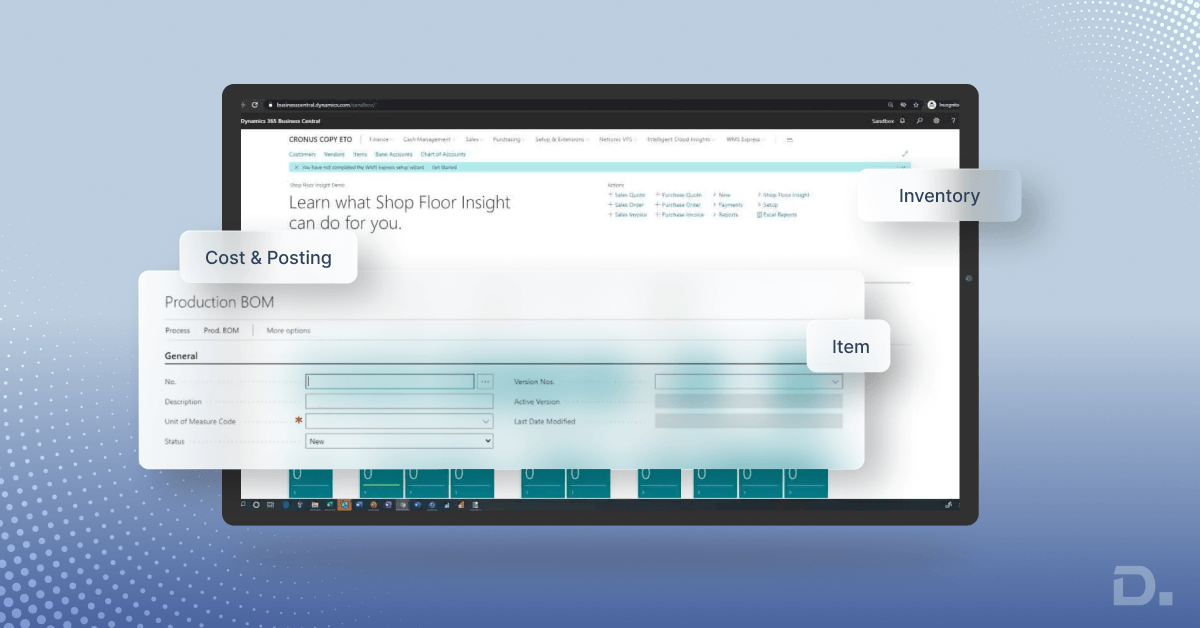
Apart from unifying all the data, Business Central offers you extensive visibility into your inventory and stocks.
With Business Central, businesses can automate redundant tasks, avoid potential delays, provide timely responses to customer requests, and boost productivity.
Speaking of manufacturing functionality in Business Central, it includes assembly management, product bill of materials, basic capacity planning, production orders, automatic components, capacity consumption, and a lot more.
Now, let’s expand on the functionalities to learn how Business Central is beneficial for the manufacturing sector.
System Automation
Business Central can easily be tailored to business requirements due to its seamless scalability. Also, with the growth of your business, your automation needs and workloads increase.
In such a case, the integration of Power Automate with Business Central can effortlessly automate repetitive tasks and optimize processes. This solution can accommodate your ever-evolving business processes with its highly customizable options.
Production Planning
Production planning and scheduling are integral parts of the manufacturing process. This helps in meeting customer demand, maximizing resource utilization, reducing production bottlenecks,
and meeting the delivery commitments of customers.
Production order management helps businesses track their progress and schedule orders.
Demand Forecasting
With the help of the Demand Forecasts feature, users can create forecasts related to sales and production. This helps businesses create ‘what if’ scenarios so they can effectively plan for production to meet the diverse demands of customers.
This feature can make a significant difference in ensuring the utmost customer satisfaction by sharing the correct order fulfillment dates.
This demand forecasting can be done for multiple products. For instance, make-to-order businesses do not stock up on inventories. They start production when they receive orders.
With demand forecasting, businesses can gain insight into the turnaround time, which can help them fulfill orders accordingly.
Inventory Management
Business Central can help you track your inventory levels, stop overstocking, and streamline inventory operations. It will lead to a more cost-effective approach and enhanced cash flow movement with detailed warehouse insight.
The WMS (warehouse management system) for the Business Central suite includes:
Automated Data-Capture
Consignment Management
Courier Systems Integration
Cycle Counting
eCommerce Integration
EDI (Electronic Data Interchange)
Inventory Optimization
Multiple Locations
Serial Number and Batch Tracking
Stock-Unit Management
Supply Chain Management
Using the Supply Chain Management module, you can manage your entire supply chain and logistics.
The SCM module (Supply Chain Management) takes care of all aspects of supply chain management, such as order requests, merchandise purchasing, transportation, warehousing, shipping, and order tracking.
Real-time Insights and Reporting
Business Central provides real-time actionable insights into your business performances, trends, and analytics. It lets you gauge relevant data, charts, and KPIs (Key Performance Indicators) that are aligned with your preferences.
Besides that, you can also sneak into key minute details like filtering or sorting out the data and exporting it to Excel or Power BI (Business Intelligence) for additional scrutiny.
A Canadian manufacturing workflow example
Take a mid-sized metal fabricator near Toronto that builds custom enclosures for Ontario and US customers.
Sales enter a quote and convert it to a sales order. For Ontario customers, GST/HST is applied through the tax setup. US shipments are handled under different tax treatments, so the tax groups need to be configured with your accountant rather than assumed.
Planning runs and suggests a production order for the enclosure, plus purchase orders for steel sheet, some bought in USD. Currency exchange differences land in finance, not in a spreadsheet.
The production order pulls from a certified BOM and routing: cutting, bending, welding, powder coating. Consumption and output are posted as each stage finishes.
Cost flows into finished goods inventory. When the order ships and is invoiced, cost of goods sold posts to the general ledger automatically.
At filing time, GST/HST collected on sales and tax paid on materials sit in the same system as the production data, which makes preparing the GST/HST return and any input tax credit claims easier to support.
Provincial tax adds another layer for Canadian manufacturers. Ontario uses HST, while British Columbia, Saskatchewan, and Manitoba charge PST separately from GST, and Quebec has QST. Whether PST or QST applies to materials consumed in production depends on the province and the item, so businesses should confirm the correct tax treatment with their accountant or the relevant provincial authority. Microsoft Dynamics 365 Business Central supports tax configuration, helping businesses maintain accurate tax records for reporting and reconciliation. For eligible businesses, GST Netfile is a Canada Revenue Agency service for electronically filing GST/HST returns. However, Business Central does not determine your tax obligations or automatically establish your eligibility to use this filing service.
How to Avail Manufacturing Modules
Business Central licenses has three options: Team Members, Essential, and Premium. All licensing comes per-user, but Business Central premium license is the one that offers Manufacturing module.
However, an essential license comes with limited modules, and businesses can access limited functionalities, like assembly management and the standard cost worksheet.
To get access to full manufacturing capabilities, you need to go for a premium license to avail yourself of all tools and capabilities.
If you want to experience how Business Central can work with your manufacturing company, you can also go for a Business Central trial. It is free for 30 days and can be extended to 60 days with the help of a Business Central partner.
If you facing issues getting the trial, feel free to connect with a reliable Business Central support, like Dynamics Square Canada.
How can Dynamics Square Canada help you with D365 Business Central Implementation?
Dynamics Square is a renowned Business Central partner in Canada, with 150+ technical consultants and 14+ years of industrial experience.
We can help you with D365 Business Central implementation for manufacturing businesses so that you can improve your operational efficiency, maximize your revenue and get the most out of your investment.
Being a leading Business Central partner in Ontario (Canada), we are helping growing businesses to accept innovation, digitalization, and simplify their core processes.
In case of need, feel free to schedule a free Business Central trial with our experienced Business Central consultant.
You can write us an email at info@dynamicssquare.ca or Contact us for instant support.
Frequently Asked Questions
Yes, for small and mid-sized manufacturers that want production, inventory, costing, and finance in one system. It works best for discrete and light-to-mid complexity production. Very complex scheduling, process manufacturing, or heavy shop-floor data collection may need add-ons.
Yes, the full manufacturing module (production BOMs, routings, production orders, capacity planning) is part of Premium. Assembly management is included in Essentials. Full users cannot be split across the two tiers.
Make-to-stock and make-to-order are well supported, and assemble-to-order works through assembly management. Engineer-to-order and process manufacturing are possible in some cases but should be scoped carefully, often with extensions.
Not always; if you only need production orders, material consumption, and cost tracking, Business Central may be enough. If operators need terminals, live machine data, or step-by-step quality checks on the floor, add an MES or a shop-floor extension.